
Enhanced DM Notifications: Stay Informed Without the Noise

Enhanced DM Notifications: Stay Informed Without the Noise
Feature Release: 04/14/2026
Direct message notifications just got smarter - so your inbox stays useful, not overwhelming.
With new batching and flexible frequency settings, members can stay on top of conversations without being flooded with emails.
Why This Matters
Real-time notifications solve one problem - missed messages - but creates another: too many emails.
Active conversations could quickly overwhelm inboxes, causing members to tune out notifications altogether. These updates strike the right balance, helping members stay informed without the noise.
What's New
Smarter Email Batching
Building on the real-time notifications introduced previously - which alert you when new conversations start while you’re offline - we’ve added smarter batching for follow-up messages within those same conversations.
- The first message in a new conversation still triggers a notification
- Additional messages in that conversation are grouped into a single email
- Messages are batched over a 2-hour window (default)
- Each email provides a summary of new activity
- No message content is included, keeping conversations private
User-Controlled Frequency
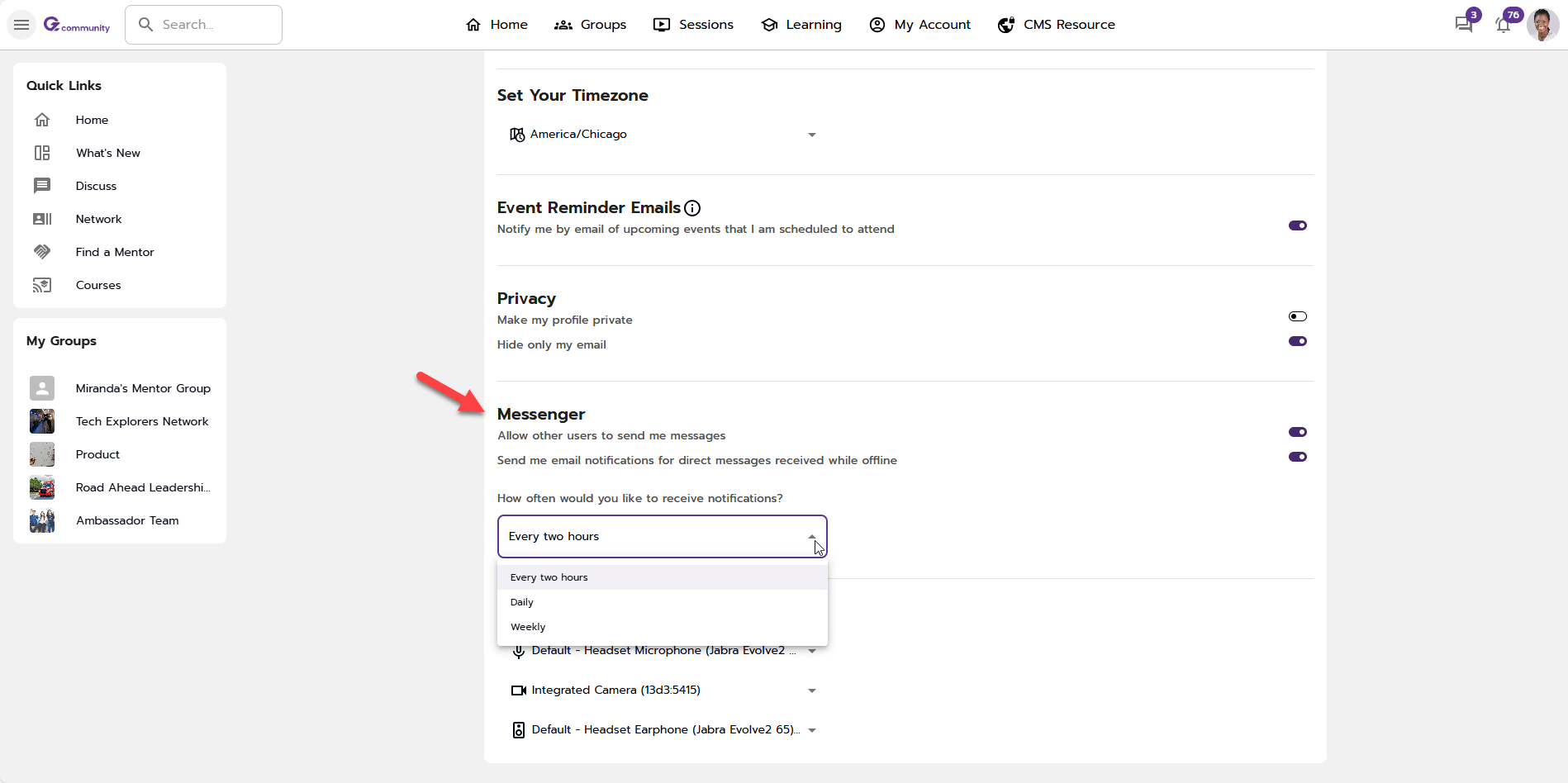
Members can now choose how often they receive email notifications:
- Every 2 hours (default)
- Daily summary
- Weekly summary
- Or turn notifications off entirely
This gives each user control over how they stay informed.
How It Works
When you’re offline, messages are collected during your selected time window. At the end of that window:
- You’ll receive a single summary email
- If you’ve logged into the platform during that window, no email is sent
This keeps notifications relevant and reduces unnecessary inbox clutter.
These updates work alongside your existing notifications:
- In-app notifications still appear in real time when you’re online
- The Daily Digest continues to highlight unread conversations
Where to Update Your Preferences
Members can adjust their notification settings at any time:
- Go to Settings from your profile
- Navigate to the Messenger section
- Toggle email notifications and select your preferred frequency
Open the Door to More Engagement
These enhancements create a more thoughtful notification experience - one that keeps members engaged and informed without overwhelming them.